Here’s how I installed an external USB Bluetooth adapter INSIDE my laptop and made it internal. My laptop wasn’t Bluetooth ready, it didn’t have internal Bluetooth connector and antenna but I needed it in order to access the cell phone without running a cable.
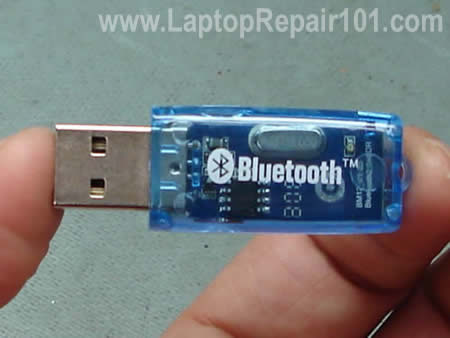
USB Bluetooth adapter
My first option was using the external USB Bluetooth adapter as is but it wasn’t very convenient. I decided to find a way to install this adapter inside the laptop.
In order to replace the power jack in your laptop you’ll have to remove the jack from the motherboard as I explained in the previous post: Replacing DC power jack.
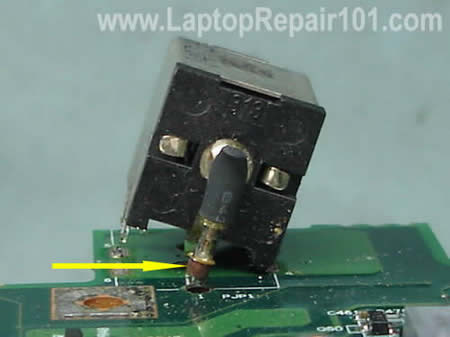
While removing the jack you can accidentally pull out the internal copper coating (I’ll call it a sleeve) from the inside of the “+” terminal as it shown on the picture below.
Damaged power jack connection

Here’s how you can fix, or to be precise, work around some hardware problem without taking apart the laptop.
1. Network port failure.
In most laptops the network port (aka RJ-45 port) is soldered directly to the motherboard. If for some reason the network port fails (I’m talking about hardware, not software failure), the whole motherboard has to be replaced.
Instead of replacing the motherboard, you can use a PCMCIA network card (aka LAN PC card). You plug this card into the available PC slot in your laptop and get a network port instead.

This guide explains how to fix a broken keyboard connector on a laptop motherboard. I do not claim that my instructions will work for any connector type in any laptop brand, but if I can help a few people, I can call my mission accomplished.
Let’s say the keyboard in your laptop stopped working properly and you decided to install a new keyboard yourself. You disassembled the laptop, removed the keyboard, tried to unlock the keyboard connector and… OHH! MAN!… a piece of the locking clip on the connector got broken!
What can you do? Unfortunately, you don’t have a lot of options. The keyboard connector is permanently soldered to the motherboard and cannot be replaced at home. If the connector was damaged, you’ll have to replace the whole motherboard, use the laptop with an external USB keyboard, or…. try the following trick.